Trading Bot Flip Strike — a powerful signal tool for binary options
Introduction
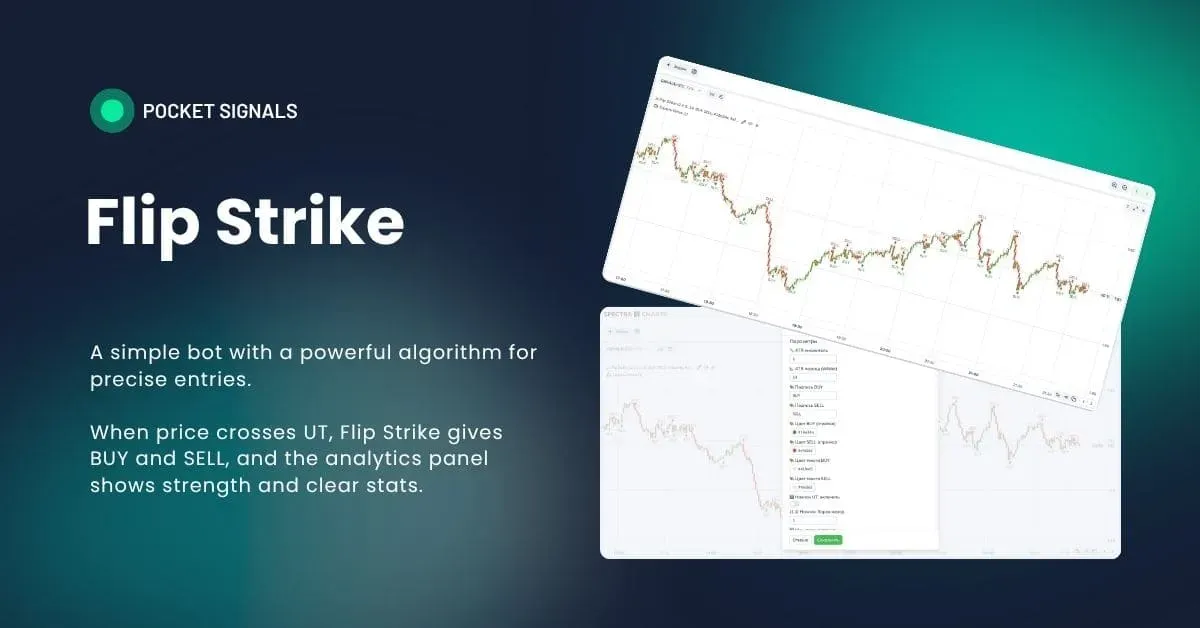
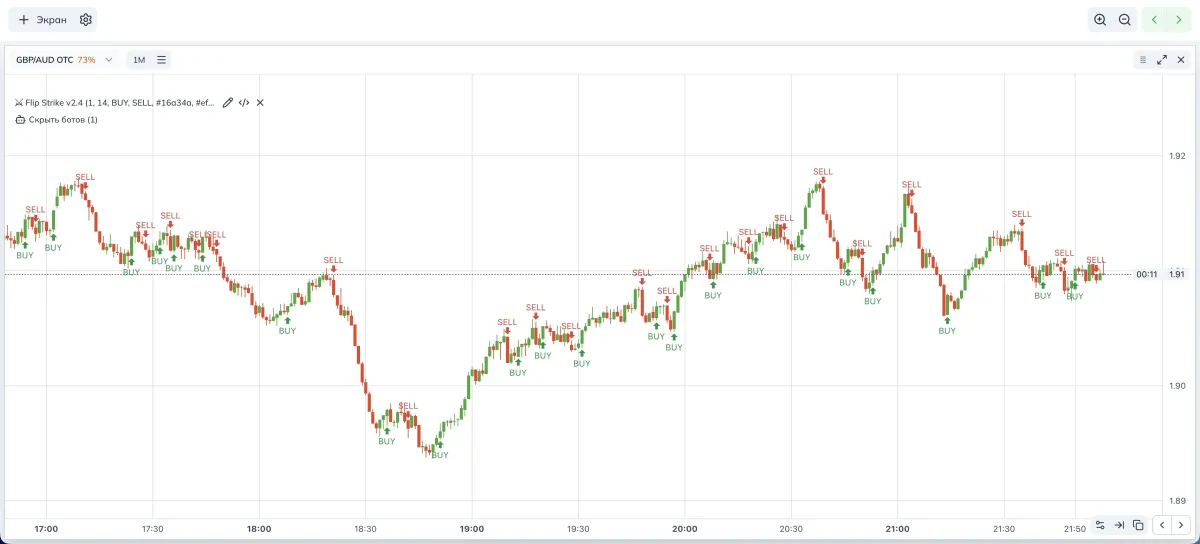
Flip Strike is a signal bot for binary options with a clear logic: price crosses the UT line based on ATR, the bot issues BUY or SELL, and the built-in HUD card shows live statistics and strength hints.
All of this runs right inside Spectra Charts, which is convenient for learning and for quickly working with strategies on Pocket Option. At PoSignals we use Flip Strike as a basic impulse detector to which you can easily add filters and entry discipline.
Before we start, let’s explain the terms in simple words.
- ATR — Average True Range, measures the market’s “breathing,” helps understand the typical candle range
- UT line — a dynamic reference line around price, moves at an ATR distance, flips direction at a break; essentially a trend “trailing stop line”
- TTL — time-to-live of the hint in bars, how many bars the signal stays relevant given the impulse strength
- WR — win rate, the share of winning signals over a history window
- Re-entry — an additional attempt after the first if the first didn’t finish in profit or was a refund
How the bot makes decisions
- Builds ATR and forms the UT line based on it.
- Tracks the crossover of price with UT. If price breaks the line upward from below — that’s BUY; if it breaks downward from above — SELL.
- Passes the event through a set of quality filters that you enable as needed.
- Calculates WR statistics for a selected history window and can break wins down by attempts considering re-entries.
- Shows a HUD card with candle strength, slope, distance to UT in ATR, volatility level 1–10, and an alert if WR drops below the threshold.
Bot parameters (visual)
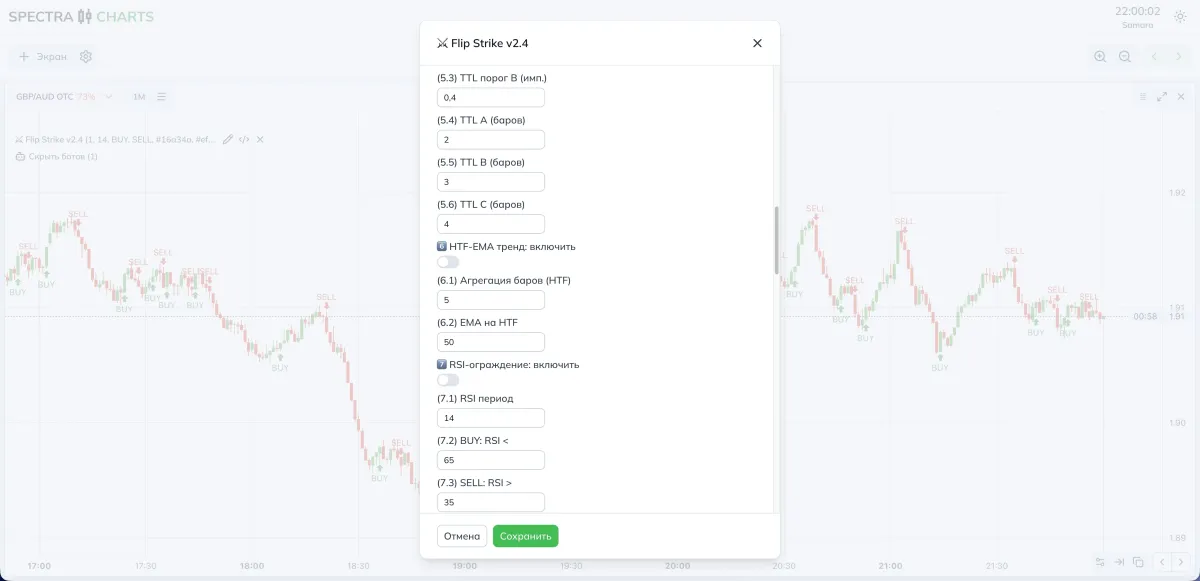
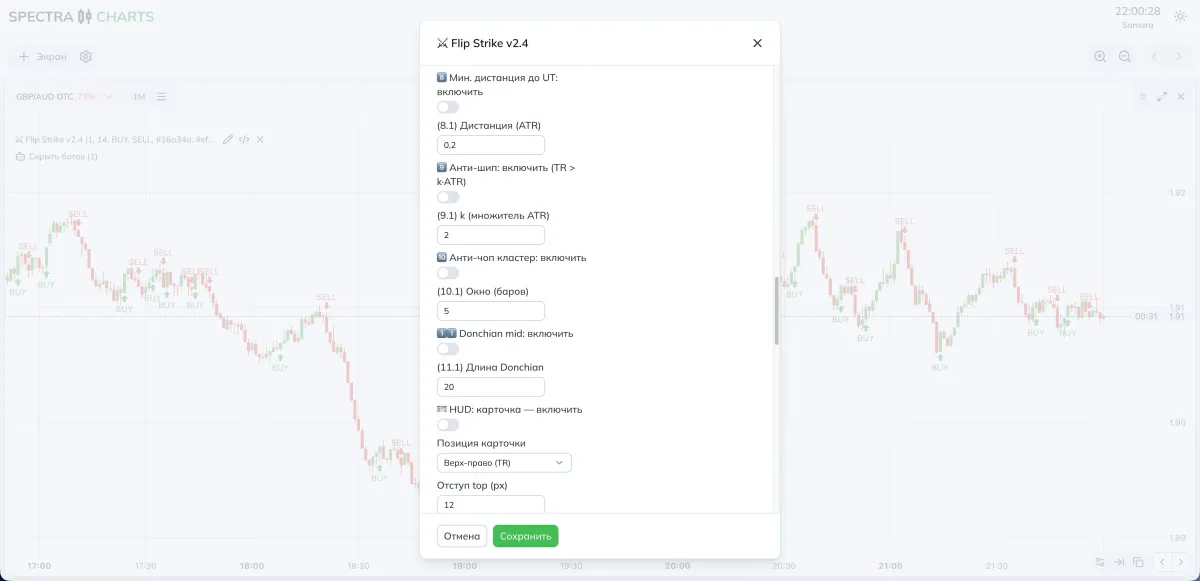
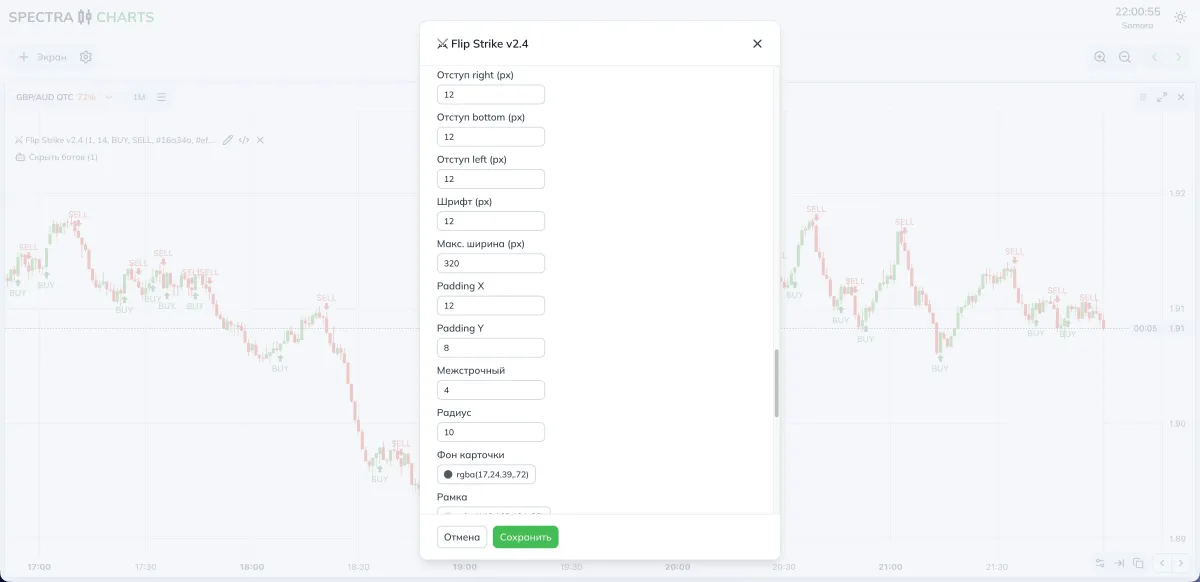
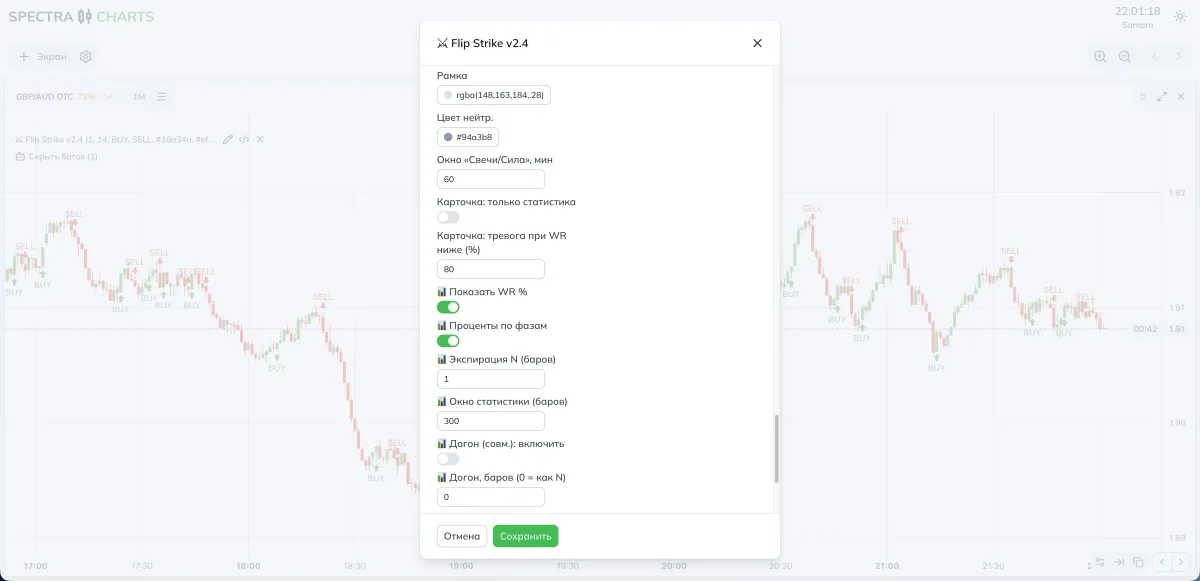
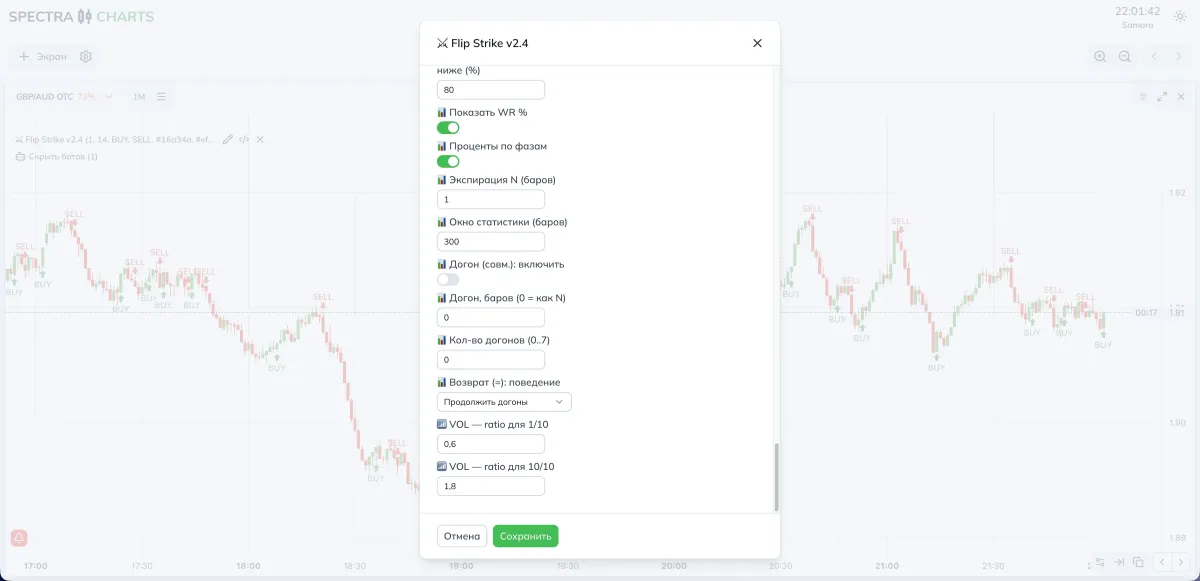
Parameters and impact
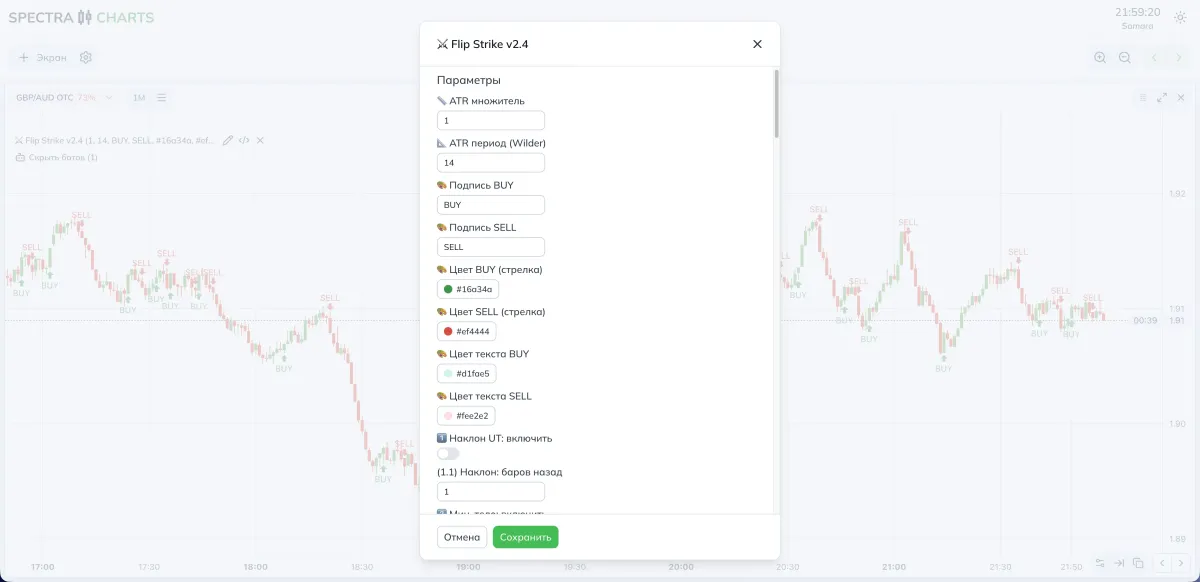
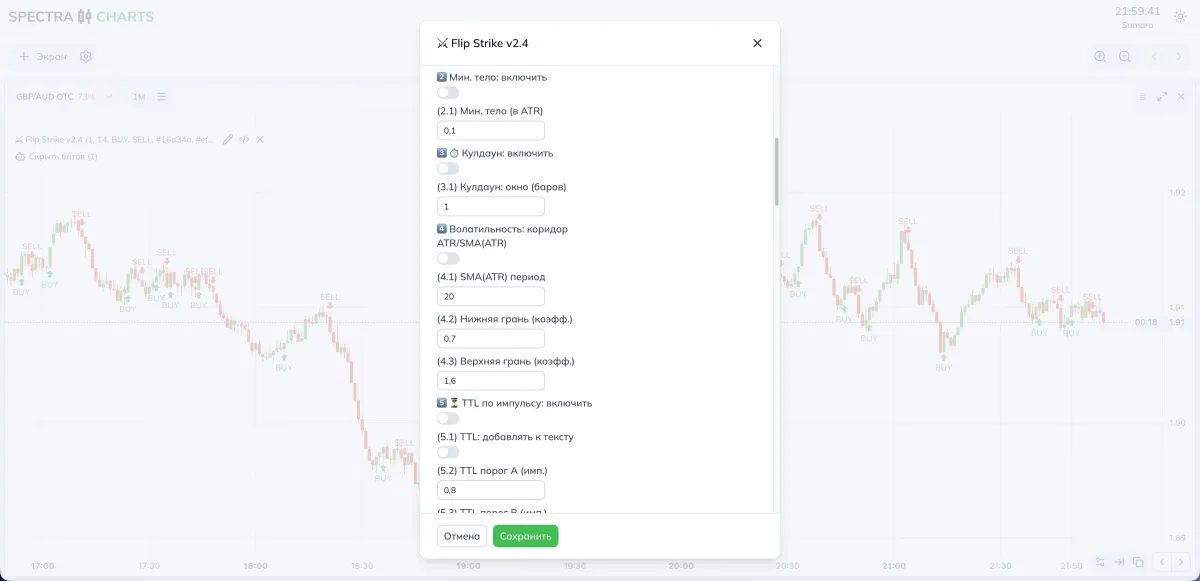
Below are descriptions in Russian, as in the interface. In the right columns you’ll find tips on what happens if you decrease or increase a setting. Adjust only what you understand — the rest of the filters can be left off.
ATR and UT
| Parameter | What it does | If you decrease | If you increase |
|---|---|---|---|
| ATR multiplier | How far UT is from price in ATR fractions | More crossovers, more sensitive | Fewer noisy crossovers |
| ATR period | ATR calculation length | Reacts faster, more noise | Smoother and more stable, but later |
Label appearance
| Parameter | What it does |
|---|---|
| BUY, SELL label | Text on the signal marker |
| BUY, SELL color | Arrow color for BUY and SELL |
| BUY, SELL text color | Text color on the marker |
1 UT slope
| Parameter | What it does | If you decrease | If you increase |
|---|---|---|---|
| UT slope, enable | Allow filtering by UT direction | — | — |
| Slope, bars back | How many bars to compare for slope | More sensitive | More demanding to trend |
2 Minimum candle body
| Parameter | What it does | If you decrease | If you increase |
|---|---|---|---|
| Min. body, enable | Enable the “small bodies” filter | — | — |
| Min. body, in ATR | Minimum ATR fraction for the candle body | More signals | Rarer, but stronger bodies |
3 Global cooldown
| Parameter | What it does | If you decrease | If you increase |
|---|---|---|---|
| Cooldown, enable | Pause after a signal to prevent spam | — | — |
| Cooldown, window bars | Pause length | More signals | Fewer signals, cleaner flow |
4 ATR volatility corridor and ATR-SMA
| Parameter | What it does | If you decrease | If you increase |
|---|---|---|---|
| Corridor, enable | Restrict operation by volatility | — | — |
| SMA ATR period | ATR smoothing for the corridor | Livelier but noisier | Calmer backdrop |
| Lower bound, coeff | Minimum ATR relative to ATR-SMA | More on quiet market | Ignore “sleepy” areas |
| Upper bound, coeff | Maximum ATR relative to ATR-SMA | More on spikes | Cut extreme volatility |
5 Impulse-based TTL and label
| Parameter | What it does | If you decrease | If you increase |
|---|---|---|---|
| TTL by impulse, enable | Vary TTL based on candle strength | — | — |
| TTL, add to text | Write TTL in the marker, e.g., BUY 2b | — | — |
| TTL thresholds A and B | Impulse strength thresholds in ATR | Easier to get short TTL | Fewer short TTLs, more long ones |
| TTL A, B, C, bars | TTL values for strong/medium/weak | Short hint lifetime | Signal “lives” longer |
6 Higher-TF trend by EMA
| Parameter | What it does | If you decrease | If you increase |
|---|---|---|---|
| HTF-EMA trend, enable | Align with the higher timeframe | — | — |
| HTF bar aggregation | How many bars to aggregate | Closer to current TF | Clearer trend, less noise |
| EMA on HTF | EMA length on the higher TF | Changes faster | More stable trend filter |
7 RSI guard
| Parameter | What it does | If you decrease | If you increase |
|---|---|---|---|
| RSI guard, enable | Overbought/oversold filter | — | — |
| RSI period | RSI length | Livelier, noisier | Smoother backdrop |
| BUY, RSI < | Upper limit for buys | Fewer BUY blocks | More BUY blocks at high RSI |
| SELL, RSI > | Lower limit for sells | Fewer SELL blocks | More SELL blocks at low RSI |
8 Minimum distance to UT
| Parameter | What it does | If you decrease | If you increase |
|---|---|---|---|
| Min. distance to UT, enable | Require price to be away from the line | — | — |
| Distance, ATR | Minimum distance at entry | More signals near UT | Fewer, but cleaner entries |
9 Anti-spike
| Parameter | What it does | If you decrease | If you increase |
|---|---|---|---|
| Anti-spike, enable | Ignore abnormal “needles” | — | — |
| k ATR multiplier | How much larger than ATR a spike must be | More sensitive to bursts | Filter triggers rarely |
10 Anti-chop cluster
| Parameter | What it does | If you decrease | If you increase |
|---|---|---|---|
| Anti-chop cluster, enable | Block signals against a recent series | — | — |
| Window, bars | How many recent events to consider | Stricter to chop | Looser, more entries |
11 Donchian mid alignment
| Parameter | What it does | If you decrease | If you increase |
|---|---|---|---|
| Donchian mid, enable | Require price to be above/below channel middle | — | — |
| Donchian length | Channel window | Middle changes faster | Middle line more stable |
HUD card
| Parameter | What it does |
|---|---|
| HUD, enable and Card position | Show the card and choose a corner |
| Offsets, font, width, paddings, radius | Appearance and readability |
| Background, border, neutral color | Card palette |
| Window Candles and Strength, min | How many minutes to analyze in the card |
| Card, stats only | Hide strength rows, leave WR and breakdown |
| Alert when WR below, percent | Highlight the card if WR drops below the threshold |
Statistics and re-entries
| Parameter | What it does | If you decrease | If you increase |
|---|---|---|---|
| Show WR percent | Show win rate | — | — |
| Phase percentages | Breakdown of wins by attempts 1, 2, and so on | — | — |
| Expiration N bars | Trade duration in bars | Faster, more dynamic entries | Closer to swings |
| Statistics window, bars | History depth for WR | Livelier but less stable | More stable estimate |
| Re-entry, enable and Number of re-entries | How many additional attempts to count | Fewer attempts | More attempts in stats |
| Re-entry, bars | Window length for re-entries | Short restarts | Longer wait |
| Return, behavior | What to do when close equals entry | Continue or stop re-entries |
How to tune for the task
- More signals
- Lower the ATR multiplier,
- Shorten the ATR period,
- Reduce Min. body, in ATR,
- Turn off or soften the RSI guard,
- Lower Min. distance to UT,
- Set Cooldown to 0–1,
- Widen the volatility corridor or disable it altogether.
- Fewer but cleaner
- Increase the ATR multiplier,
- Lengthen the ATR period,
- Enable Min. body and raise the threshold,
- Add Min. distance to UT,
- Enable HTF-EMA trend,
- Keep Invalidation on close in strategies,
- Use the Anti-chop cluster with a 5–7 window.
Filter combination ideas
- UT slope plus Donchian mid. Signal only when UT is sloped in the entry direction and price is on the correct side of Donchian mid — this cuts trades against the local channel.
- RSI guard plus TTL. In an overheated market, TTL will be shorter and rarer, reducing “chasing” candles.
- Volatility corridor plus anti-spike. Leaves only “workable” impulses, filtering out second-long needles and noise spikes.
Practical presets
- ATR multiplier — 0.9–1.2
- ATR period — 10–14
- UT slope — enable, 1–2 bars
- Min. body, in ATR — 0.08–0.12
- Min. distance to UT, ATR — 0.10–0.20
- Volatility corridor — ATR-SMA 10–20, bounds 0.70–1.60
- RSI guard — mild: BUY below 70, SELL above 30
- HTF-EMA trend — optional, HTF 3–5 bars, EMA 30–50
- Anti-chop cluster — window 5
- Donchian mid — enable, length 20
- Expiration N — 1 bar, re-entries 0–1
- HUD alert when WR below — 80
- ATR multiplier — 1.2–1.6
- ATR period — 14–20
- UT slope — enable, 2–3 bars
- Min. body, in ATR — 0.12–0.20
- Min. distance to UT, ATR — 0.20–0.35
- Volatility corridor — ATR-SMA 20–40, bounds 0.80–1.40
- RSI guard — stricter: BUY below 65, SELL above 35
- HTF-EMA trend — enable, HTF 5–10 bars, EMA 50–100
- Anti-chop cluster — window 5–7
- Donchian mid — enable, length 20–40
- Expiration N — 2–3 bars, re-entries 0–1
- HUD alert when WR below — 75
Step-by-step strategy
Context
Open an asset in Spectra Charts. If you use HTF-EMA trend and Donchian mid, make sure the higher-TF direction is not against the entry.
Signal
Wait for a crossover of price with UT in the required direction. Check the filters; in the HUD card, watch WR, Strength, and VOL 1–10.
Entry
For beginners, it’s better to enter on the next candle after the signal, especially if you use Min. distance to UT.
Expiration
Start with 1 bar. In a calm market and with the trend, you can test 2–3 bars. Avoid news spikes.
Re-entry
Only on a new signal or a fresh crossover. Do not violate the Cooldown.
Risk
Fixed trade size. Enable re-entries only if you clearly understand the logic and statistics for your asset.
FAQ
Increase the ATR multiplier and ATR period, enable Min. body and raise the threshold, add Min. distance to UT, enable Anti-chop cluster and UT slope.
Lower the ATR multiplier and the Min. body threshold, relax the RSI guard, reduce Min. distance to UT, temporarily disable the Volatility corridor.
Check the volatility backdrop and news, narrow the Statistics window, adjust Expiration N, enable HTF-EMA trend to go with the higher trend.
TTL depends on impulse strength in ATR and slope. Lower TTL thresholds A and B or increase TTL A, B, C, or disable TTL by impulse.
That’s an alert — WR is below the Alert when WR below, percent threshold. Raise filter thresholds or switch the asset and wait for stabilization.
Conclusion
Flip Strike remains simple in concept and useful in practice. The crossover of price and UT provides a clear trigger, and the set of filters lets you tailor the bot to your style. The HUD card saves time by showing WR, strength, and volatility here and now, which is especially convenient on Pocket Option in Spectra Charts. Start with the basic presets, then gradually add filters and track statistics so the strategy stays clear and disciplined.
Trading Bot OverZero Flip 30s–1m — powerful signals from crossover detection
A scalping strategy on 30 seconds and 1 minute based on moving-average crossovers with OsMA confirmation. Parameters, presets for OTC and the real market, working strategy.
Trading Bot Fractal Edge Breakout — breakout of fractal edges
Bill Williams’ fractal levels, the Fractal Edge Breakout strategy idea and its implementation in the bot: signal logic, parameters, settings for OTC/real market, examples, and a trading plan.