How to create an account on BingX, complete verification, and buy USDT for rubles via P2P
How to create an account on the BingX exchange, complete verification, and buy cryptocurrency for rubles via P2P
Trading on Pocket Option or withdrawing funds to bank cards often requires a convenient and safe way to purchase cryptocurrency. The BingX exchange is one of the most reliable options for buying USDT for rubles via P2P, without unnecessary restrictions or complex procedures.
In this detailed guide, we’ll go through how to register, complete verification, and buy cryptocurrency as safely as possible. The instructions are suitable for beginners and for those encountering P2P operations for the first time.
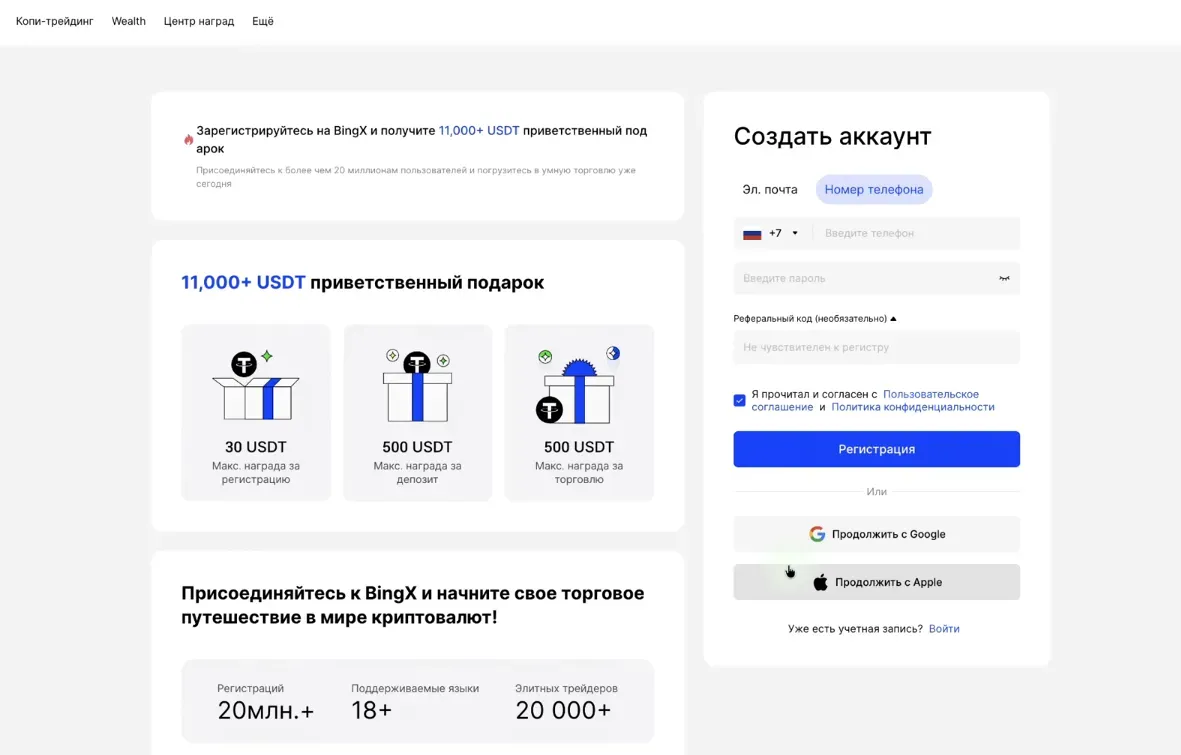
Step 1. Registering an account on BingX
Go to the official website BingX.com (or use the link from the description if you are watching a video).
- Click the “Register” button.
- Choose a convenient method:
- registration via email;
- registration via phone number.
Then enter:
- your email address or phone number;
- create a strong password;
- if necessary, check whether the referral code has been applied (this gives bonuses and fee discounts).
Check the box to agree with the service terms and click “Register”.
You can register via Google or Apple, but the manual method is preferable — fewer technical issues when recovering or changing devices.
Step 2. Completing verification (KYC)
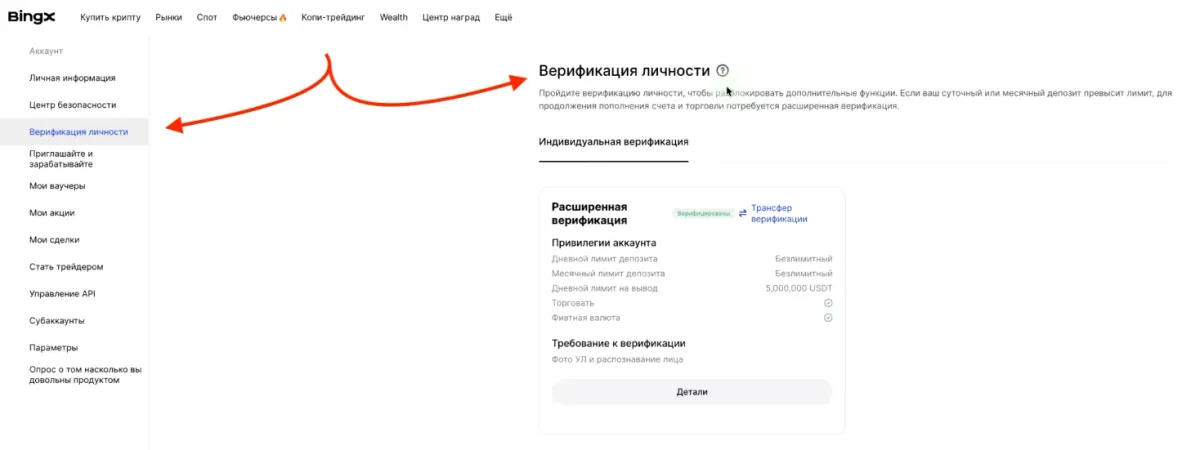
To buy cryptocurrency, use P2P, and avoid withdrawal limits, you must complete identity verification.
- Click the profile icon (top right corner).
- Select “Identity Verification (KYC)”.
- Complete advanced verification. It provides:
- no withdrawal limits;
- full access to exchange and deposit functions;
- enhanced protection against fraud and account blocks.
You need to upload:
- a photo of your document (passport or driver’s license),
- a selfie with the document.
After submission, wait for the review. Usually takes from 30 minutes to several hours.
Step 3. Buying cryptocurrency (USDT) for rubles via P2P
Once your account is verified, you can proceed to buy cryptocurrency.
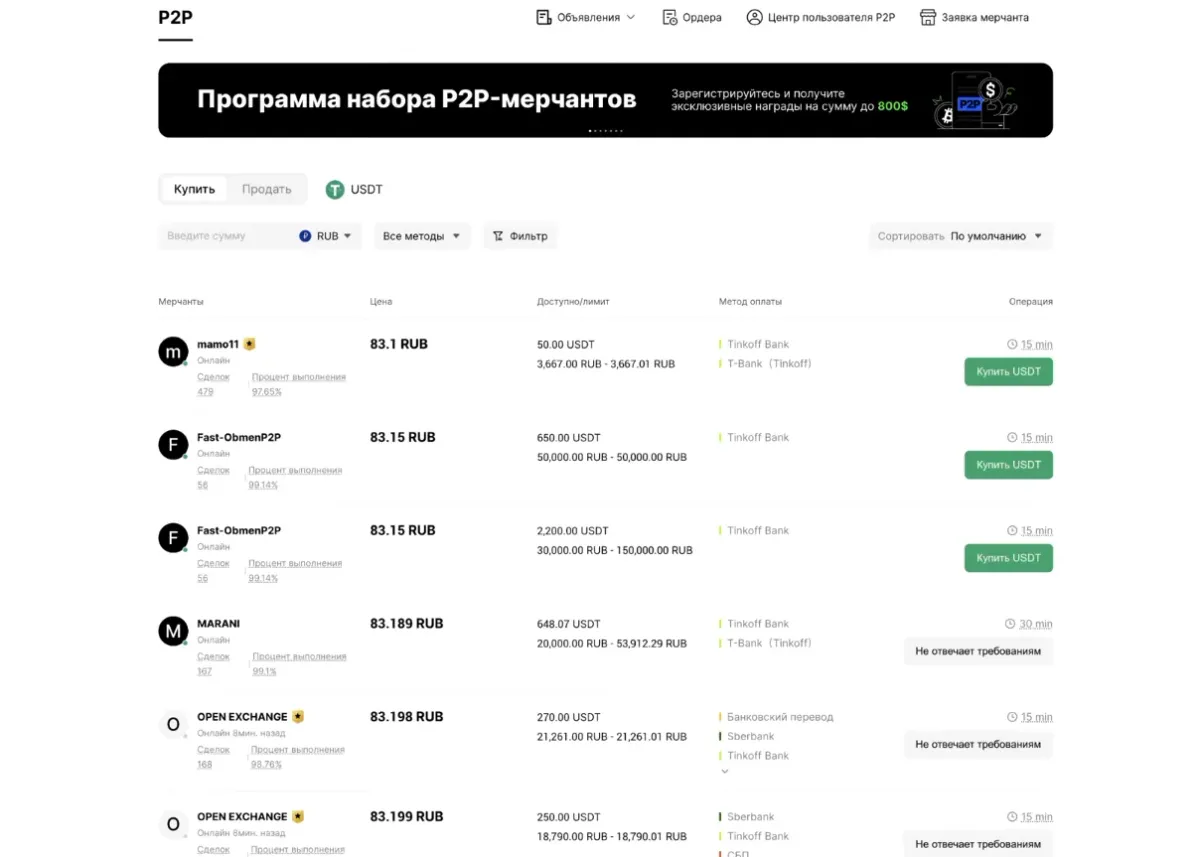
- Open “Buy Crypto” → “P2P”.
- Make sure the currency RUB is selected.
- Enter the amount you want to spend — for example, 10,000 rubles.
- In the payment methods, enable:
- SBP,
- Tinkoff,
- VTB,
- Raiffeisen,
- or another convenient bank.
- Enable the option “Verified Sellers Only” — this protects you from fraud.
- Select an offer with a suitable rate and click “Buy”.
- Open the chat with the seller and read the instructions carefully.
Important safety rules for the transfer
- Transfer funds strictly to the account specified by the seller.
- Do not send money to alternative details — this is a common fraud scheme.
- After payment, save the receipt (PDF or screenshot).
- Click “Paid” and wait for the seller’s confirmation.
Once confirmed, USDT will appear in your BingX balance.
What to do next?
Now your account has USDT — the most popular stable cryptocurrency, perfect for further operations:
- topping up a Pocket Option deposit,
- transferring funds to a crypto wallet,
- participating in spot or futures trading.
Quick summary
- BingX is a safe exchange for buying cryptocurrency for rubles.
- It is best to complete KYC right away — it unlocks all features and removes limits.
- Buying USDT is easiest via P2P with the “verified sellers” filter.
- Follow safety rules during transfers — send money only to the specified details.
This is a practical and proven workflow used by thousands of traders working with binary options and the Pocket Option service.
Where to Start Your Trading Journey: A Complete Step-by-Step Guide to Pocket Option
A roadmap for beginners: a step-by-step plan from registration and safe deposits via cryptocurrency to the basics of technical analysis and setting up Spectra Charts.
Candlestick patterns in trading: how to find, filter, and apply them on the chart
Step-by-step breakdown of major candlestick patterns: engulfing, harami, hammer, star, three soldiers and more. How to find them on the chart, filter false signals, and apply them in real trading.